How to Extract and Verify Custom Financial Data from SEC Filings with AI
Explore 10-K reports, select relevant sections, build custom financial tables, and trace every value back to its source.
A portfolio manager at a New York asset manager wants to answer a question that sounds straightforward: over the past three fiscal years, how has Apple’s revenue mix shifted across product lines, and is Services becoming a structurally larger part of the business?
The data exists in Apple’s FY2025 Form 10-K. But the answer is not sitting in a single, analysis-ready table. Product-line net sales appear in Note 2 – Revenue. Management’s explanation of why those lines moved appears in MD&A – Products and Services Performance, alongside year-over-year change figures. And the field the analyst actually needs—Services as a percentage of total net sales—does not exist in the filing at all. It has to be derived from two numbers that live in different places.
This is the gap Gentables is built for. Not extracting a table that already exists, but exploring the document structure, selecting the right scope, building the table the analysis requires, and verifying every value against the original disclosure. We will walk through that workflow using a single query on Apple’s FY2025 10-K, then show how the same method applies to a second query on segment expenses and a third on lease maturities.
1. Explore: Find the Relevant Information Before Deciding What to Extract
Query 1 (Q1): “For Apple’s past three fiscal years, give me net sales by product line, year-over-year growth, and Services as a percentage of total net sales.”
The instinct is to search for “Services revenue” and extract the first table that appears. But Apple’s 10-K distributes the relevant information across multiple layers of the document, each serving a different analytical purpose.
Note 2 – Revenue contains the disaggregated net sales table. It is the authoritative source for the absolute dollar figures across fiscal 2025, 2024, and 2023: iPhone at $209,586 million, $201,183 million, and $200,583 million; Services at $109,158 million, $96,169 million, and $85,200 million; total net sales at $416,161 million, $391,035 million, and $383,285 million.
MD&A – Products and Services Performance contains the same revenue categories, but adds the year-over-year change percentages and management’s explanation for each movement. iPhone grew 4% in fiscal 2025, Mac grew 12%, iPad grew 5%, Wearables declined 4%, and Services grew 14%. Management attributes the Services increase to higher net sales from advertising, the App Store, and cloud services.
Segment Information and Note 1 – Summary of Significant Accounting Policies are also present in the outline. They are relevant to a different question—one about reportable segment profitability and the adoption of ASU 2023-07—but they are not required to answer Q1. Selecting them would expand the scope beyond what Q1 asks for.
The value of Explore is not that it forces the user across every chapter. It is that it shows what each chapter can contribute—authoritative figures, change percentages, management commentary, or accounting-policy context—so that the subsequent selection decision is deliberate rather than accidental.
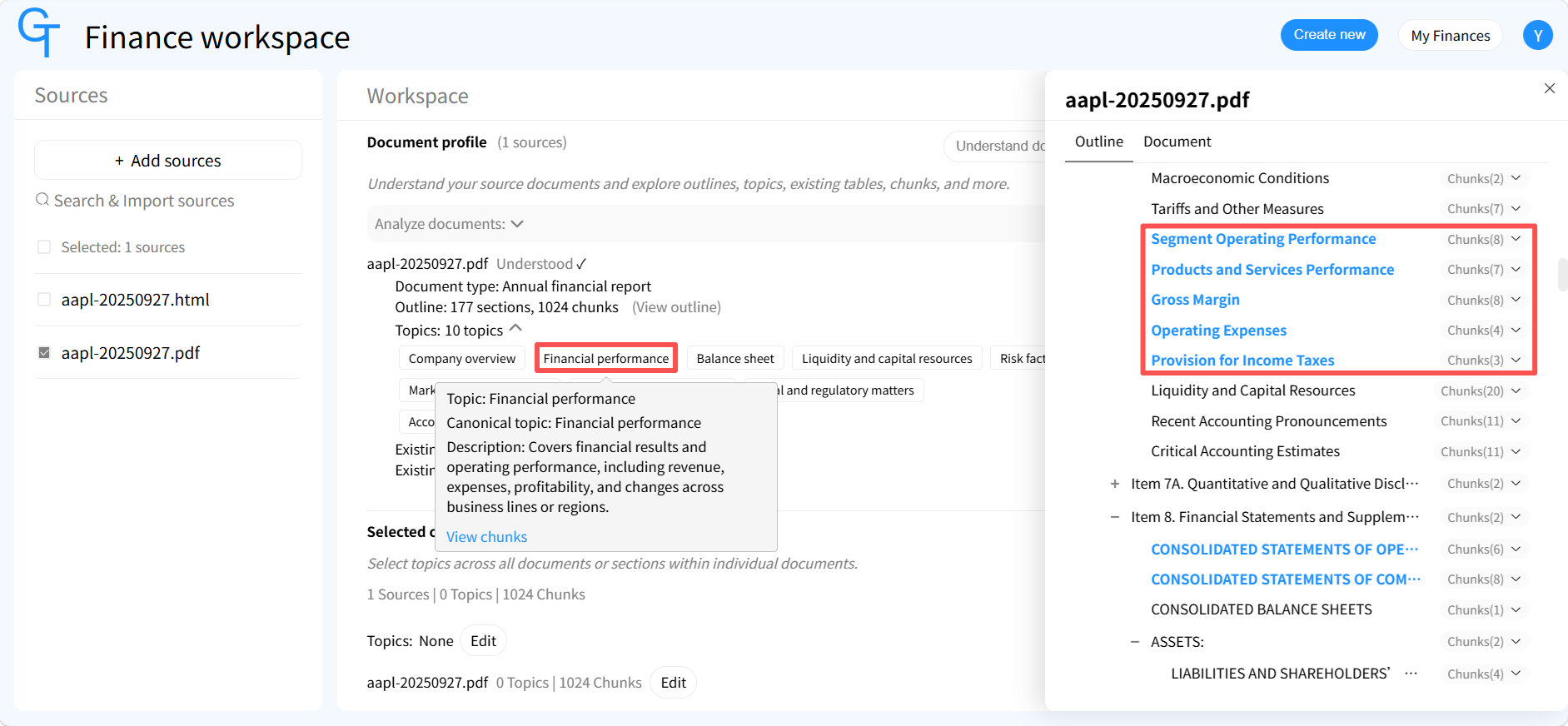 Figure 1. Gentables Explore view of Apple FY2025 10-K. Source: Gentables Finance Workspace.
2. Select: Define the Scope of the Analysis
Select Content is where the analyst decides which of those layers enter the task. For Q1, the scope is narrow by design: Note 2 – Revenue for the dollar values, and MD&A – Products and Services Performance for the year-over-year change figures and management’s explanation. Segment Information and Note 1 are excluded because Q1 does not ask about segment expenses or accounting-standard adoption.
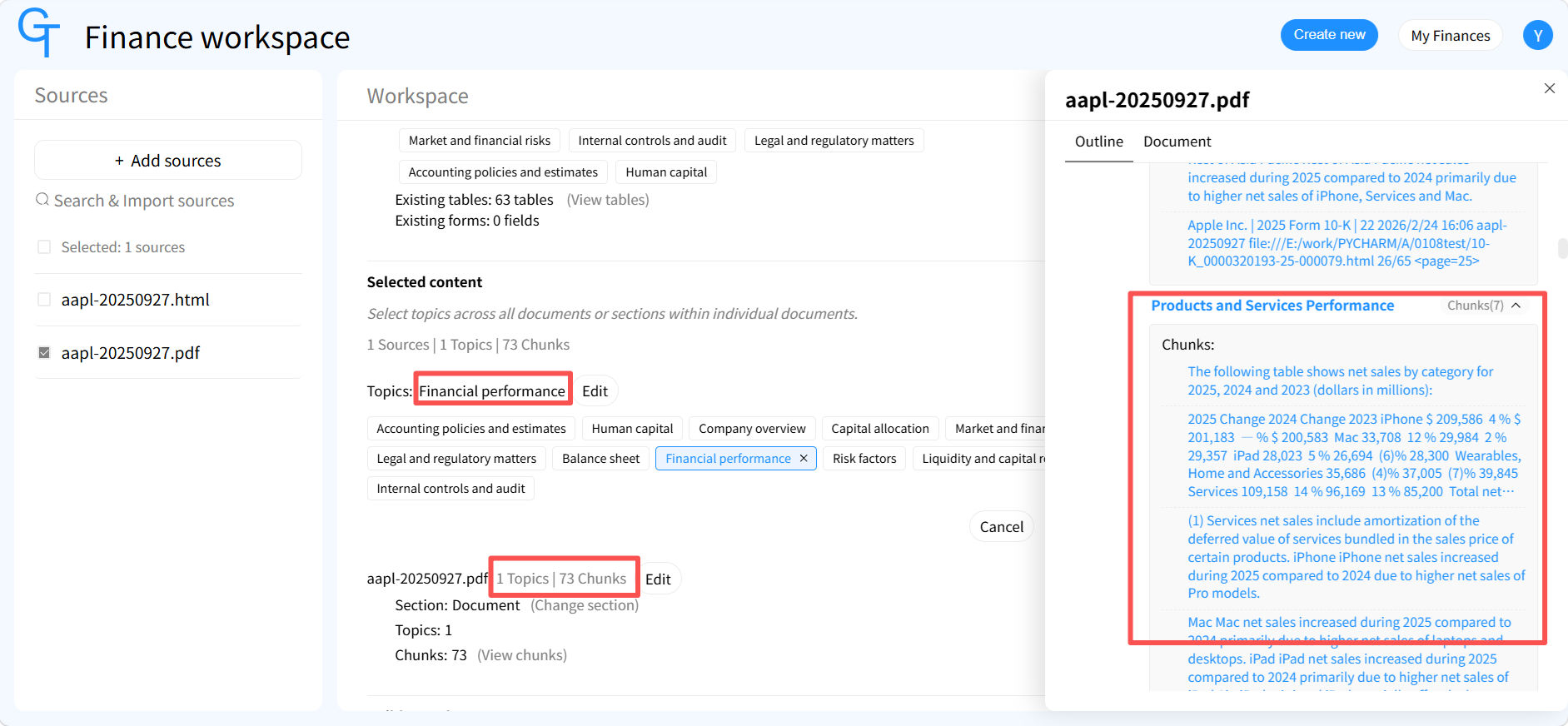 Figure 2. Gentables Select Content view for Apple FY2025 10-K. Source: Gentables Finance Workspace.
The contrast with a second query makes the point sharper.
Query 2 (Q2): “Extract reportable segment revenue and significant segment expenses from Apple’s FY2025 10-K, and check how ASU 2023-07 adoption and retrospective presentation affect those disclosures.”
Q2 requires a different scope. Apple adopted ASU 2023-07 beginning with the 2025 annual reporting period, using a retrospective transition method. The standard requires disclosure of segment expenses that are significant and regularly provided to the chief operating decision maker. If the analyst selects only the segment note and omits Note 1, the output table will contain segment revenue and expense figures but will lack the accounting-policy context needed to interpret whether those figures are comparable to prior periods. Selecting Note 1 alongside the segment note gives the table a place to capture the adoption method and the nature of any retrospective presentation.
Same filing. Same Explore results. Different scope. Different table. Select Content defines what the analysis covers; Verify later determines whether the selected data is actually comparable.
3. Build: Generate a Custom Financial Table with the Right Intent
Gentables does not ask the user to choose between “extract” and “create” as separate operations. The Build step is a single configuration: select an intent and enter a query. The available intents include extract, summarize, compare, populate, analyze, and verify. For Q1, the appropriate intent is extract: the system generates a product-line revenue table and populates it with the corresponding data from the selected sections.
| Fiscal Year | Product Line | Net Sales ($M) | Prior-Year Net Sales ($M) | YoY Growth | % of Total Net Sales | Source |
|---|---|---|---|---|---|---|
| FY2025 | iPhone | 209,586 | 201,183 | 4% | 50.4% | Note 2 / MD&A |
| FY2025 | Mac | 33,708 | 29,984 | 12% | 8.1% | Note 2 / MD&A |
| FY2025 | iPad | 28,023 | 26,694 | 5% | 6.7% | Note 2 / MD&A |
| FY2025 | Wearables, Home and Accessories | 35,686 | 37,005 | (4)% | 8.6% | Note 2 / MD&A |
| FY2025 | Services | 109,158 | 96,169 | 14% | 26.2% | Note 2 / MD&A |
| FY2025 | Total net sales | 416,161 | 391,035 | 6% | 100.0% | Note 2 / MD&A |
The dollar values come from Note 2. The year-over-year percentages come from MD&A, where Apple already reports them; the extract intent preserves the filing’s own growth figures rather than recomputing them. The % of Total Net Sales column is the field Q1 explicitly requested, and it is derived: Services at $109,158 million divided by total net sales of $416,161 million gives 26.2%. That calculation does not appear as a discrete line item in the 10-K, but it is the metric the analyst actually needs to assess the revenue mix shift.
The Source column provides a concise reference back to the sections used. It is a summary, not a substitute for cell-level evidence—that comes in the Verify step. The critical point is that this table was produced in one extract-intent call, not by manually stitching together outputs from multiple tools. The system retained the filing’s facts, calculated the field the query required, and associated each value with its source.
 Figure 3. Gentables Build view showing the Q1 summarize-intent configuration and the build-info. Source: Gentables Finance Workspace.
The same Build mechanism handles a different disclosure structure. For a third query (Q3) —“Give me Apple’s lease liability maturities by fiscal year”—the analyst selects extract and targets the lease note. Apple discloses operating lease and finance lease maturities on an undiscounted basis: for fiscal 2026, operating leases total $1,967 million and finance leases $563 million, for a combined $2,530 million; fiscal 2027 totals $2,061 million, fiscal 2028 $1,899 million, fiscal 2029 $1,633 million, fiscal 2030 $1,424 million, and thereafter $6,757 million. The output is a maturity table with year, lease type, amount, and source. If the analyst already has a lease-schedule template, the populate intent fills that template instead of generating a new structure. Q3 is not a second narrative; it demonstrates that the intent-plus-query Build step applies to narrative-heavy footnotes as well as to revenue tables.
4. Analyze: Turn the Built Table into a Trend Analysis
The table from Section 3 is now the metadata for the next step. The analyst switches the intent to analyze, selects the Q1 revenue table as the input, and enters a trend query: “Is Services becoming a larger share of Apple’s revenue, and what does the three-year product-line trajectory show?”
The analyze intent produces a cross-year trend reading directly from the structured table. Services rose from 22.2% of total net sales in FY2023 ($85,200 million ÷ $383,285 million) to 24.6% in FY2024 ($96,169 million ÷ $391,035 million) to 26.2% in FY2025. iPhone’s share declined from 52.3% to 51.4% to 50.4% over the same period, while Mac and iPad shares were roughly stable and Wearables declined. The trajectory is consistent with a mix shift toward Services, but the analytical output does not assert a cause; it reports what the structured figures show.
This is the practical distinction between analyze and compare in Gentables. Analyze works on an existing built table and answers a trend question about the data already in hand. Compare, by contrast, generates a comparison table across multiple companies or metrics—for example, placing Apple’s Services share next to Microsoft’s or Alphabet’s. That is a separate intent and a separate workflow; Q1’s cross-year trajectory is an analyze task, not a compare task.
The analyze step also supports an alternative input mode: automatic data collection. In that mode, the system gathers the relevant data itself rather than requiring a pre-built table. Here, the analyst already has the verified Q1 table, so selecting it as metadata is the more controlled and more reproducible path.
5. Verify: Trace Values and Check Comparability
A structured table is only as useful as the analyst’s ability to check it. The verify intent operates at the cell level. When the analyst selects the FY2025 Services net sales cell in the Q1 table, Gentables returns the exact location in Note 2 – Revenue where $109,158 million is reported. The same applies to the FY2023 and FY2024 Services figures, and to each product-line value.
Verification, however, involves two distinct questions, and they should not be conflated.
Source traceability asks: where does this value come from, and does the original disclosure support it? For the Q1 table, the answer is straightforward for every net sales figure—the value is reported in Note 2 and the year-over-year percentage is reported in MD&A. For the derived Services percentage, verification traces both the numerator ($109,158 million) and the denominator ($416,161 million) to their respective Note 2 lines and confirms the calculation.
Analytical comparability asks a harder question: are the values from different periods actually on the same definitional footing? This is where Q2 becomes instructive. Apple adopted ASU 2023-07 using a retrospective transition method. That does not mean every prior-period figure was recomputed. It means the segment disclosures for earlier periods have been presented under the new requirements, and the nature and extent of that retrospective presentation must be checked against the adoption disclosure in Note 1. The verify intent for Q2 traces a segment expense cell back to the segment note, and then traces the adoption language back to Note 1, so the analyst can see which figures are newly disclosed under ASU 2023-07 and which remain directly comparable to earlier filings.
The same discipline applies to the Q1 table. Note 2’s three-year presentation is the basis for the comparison, and the values are reported as presented in the FY2025 filing. The analyst can confirm that the figures tie to the filing and that the MD&A growth percentages correspond to the Note 2 dollar values. What the system does not do is declare the periods automatically comparable; it surfaces the evidence for the analyst to make that judgment.
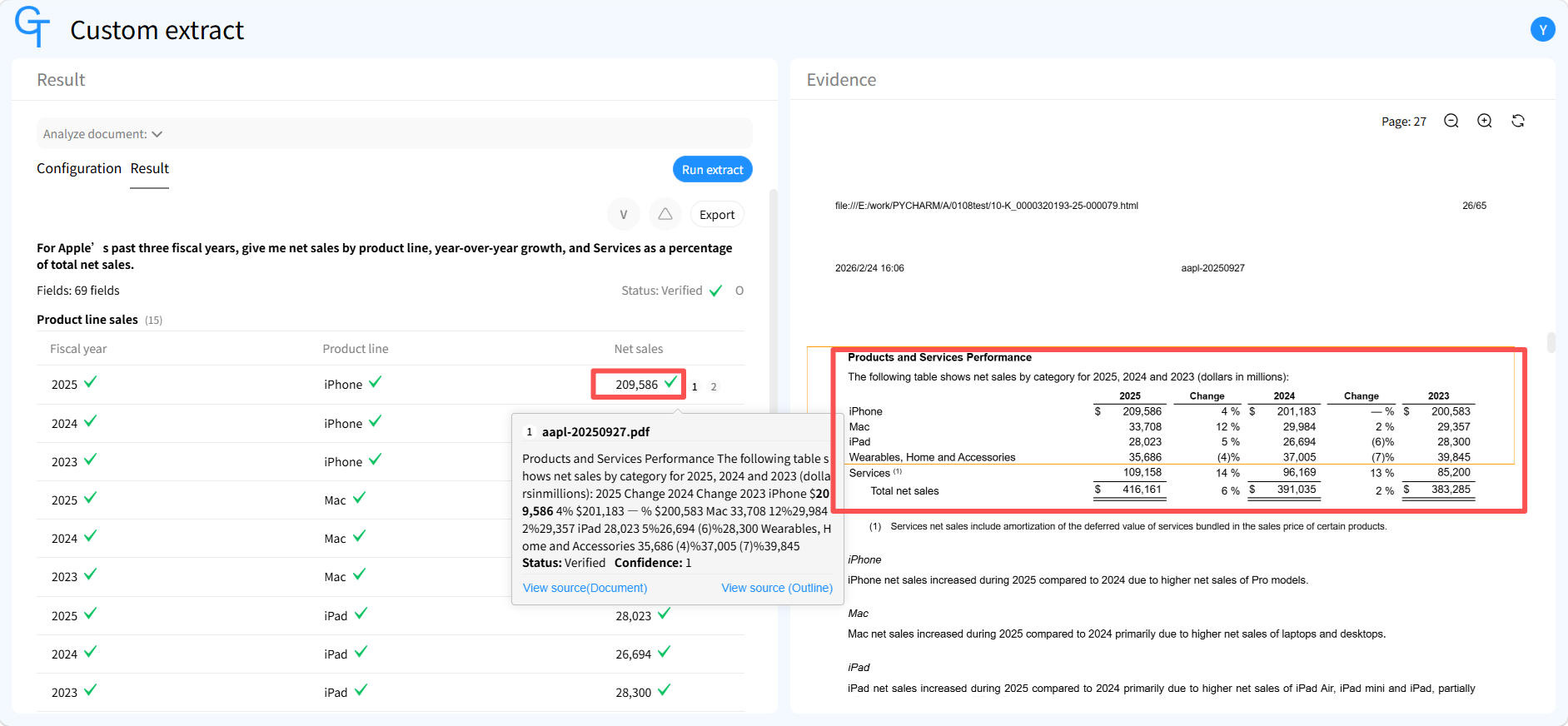 Figure 4. Gentables Verify view. Source: Gentables Finance Workspace.
6. From SEC Filings to Reusable Financial Data
The workflow for Q1 is now complete. Explore surfaced the distribution of product-line revenue, growth rates, and management commentary across Note 2 and MD&A. Select defined a scope limited to those two sections, deliberately excluding segment and accounting-policy material. Build used an extract intent to produce a single table containing dollar values, the filing’s own year-over-year percentages, a derived Services-share field, and a source column. Analyze used that table as metadata to read the three-year mix trajectory. Verify traced individual cells back to Note 2 and confirmed the basis for the derived percentage.
Q2 demonstrated that a different query produces a different scope and a different table, and that verify must distinguish source support from cross-period comparability—especially when a new accounting standard is adopted retrospectively. Q3 demonstrated that the same extract-or-populate Build mechanism applies to lease maturity disclosures, where the underlying table is already structured but the analytical fields and source linkage still have to be organized.
The output is not a static extraction. It is a reusable structured dataset: the Q1 table can be exported into a revenue-mix model, a Services-margin bridge, or a valuation framework, and every value can be traced back to the filing. The investment judgment—whether the Services shift is durable, whether the segment expense disclosures change the profitability picture, whether the lease maturity profile affects the credit view—remains with the analyst. Gentables builds the verifiable structure that judgment depends on.
Start with your own query. Upload a 10-K, explore the sections that matter, select the scope your question requires, build the table your analysis needs, and verify every value against the source. Visit Gentables Finance.
FAQ
How do I extract data from a 10-K filing with AI?
Start by exploring the filing structure in Gentables. The outline and topics view shows where product-line revenue, segment disclosures, MD&A commentary, and accounting-policy notes are located. Select the sections relevant to your question, then use the extract intent with a specific query to generate a structured table populated from those sections.
Can AI extract custom financial data that does not exist as a table in the filing?
Yes. Gentables supports queries that require derived fields. For example, Services as a percentage of total net sales does not appear as a discrete line in Apple’s 10-K, but it can be calculated from Note 2 revenue figures when included in the extract query. The resulting table combines source values, calculated fields, and source references in one structure.
How does Gentables verify that extracted financial data is accurate?
The verify intent provides cell-level source evidence. Selecting a value in a built table highlights the corresponding line in the original filing. For derived fields, verification traces both the numerator and denominator. Verify also supports checks on cross-period comparability, such as whether a figure reflects a retrospective accounting-standard adoption.
What is the difference between analyze and compare in Gentables?
Analyze works on an existing built table and answers trend questions about the data already in hand, such as whether Services share of revenue is rising over three fiscal years. Compare generates a comparison table across multiple companies or metrics. They are separate intents used for different analytical tasks.
Does Gentables replace XBRL data for SEC filings?
No. Standard financial statements in SEC filings often already have XBRL structured data. Gentables addresses the gap that XBRL does not cover: custom metrics, cross-section information, narrative disclosures, footnote data, segment expenses under ASU 2023-07, and information organized according to an analyst’s own template.
How do I check ASU 2023-07 adoption when extracting segment data?
Select both the segment note and Note 1 on significant accounting policies. The extract query can request segment revenue, significant segment expenses, and the adoption method. The verify intent then traces the adoption language to Note 1 so the analyst can distinguish newly disclosed segment expenses from figures that remain directly comparable to earlier filings.
Can I reuse extracted financial data in a financial model?
Yes. Verified structured tables can be exported and used in revenue-mix models, margin bridges, valuation frameworks, or credit analysis. Every value retains its source linkage, so the model input can be traced back to the original disclosure.
Visit Gentables Finance.