Validate OCR Table Results Against Source Images
From messy OCR output to perfectly validated tables
Structural Integrity
Automatically detect if OCR misaligned table columns, merged cells incorrectly, or misread border lines as text characters—common issues in scanned spreadsheets.
Character Precision
Catch the notorious OCR mistakes: '0' vs 'O', '5' vs 'S', or comma vs decimal point. We validate OCR accuracy at the character level to prevent data corruption.
Visual Overlay Diff
Overlay the extracted table directly onto the source image. See exactly where the OCR skipped a cell or inserted a phantom row, enabling rapid document validation.
How to validate OCR table extraction
1. Upload source image or PDF
Provide the original scanned document containing the tables you want to verify.
2. Review extracted results
Open the extracted results and inspect the structured results.
3. Generate verification report
Automatically compare extracted data against source documents and identify verified values, mismatches, unsupported fields, and missing evidence.
4. Trace evidence in the source image
Click any value to jump to the exact highlighted location in the original document.
5. Review and fix issues
Use the Artifacts workspace to correct mismatches, reconcile values, and prepare the final dataset.
6. Export trusted data
Use the Artifacts workspace to correct mismatches, reconcile values, and prepare the final dataset.
Specialized for OCR table validation
Evidence-backed cell verification
Every extracted value can be linked to supporting evidence from the source document. No more guessing where data came from.

Interactive source highlighting
Jump directly from a table cell to the exact location in the source document where the value was found.

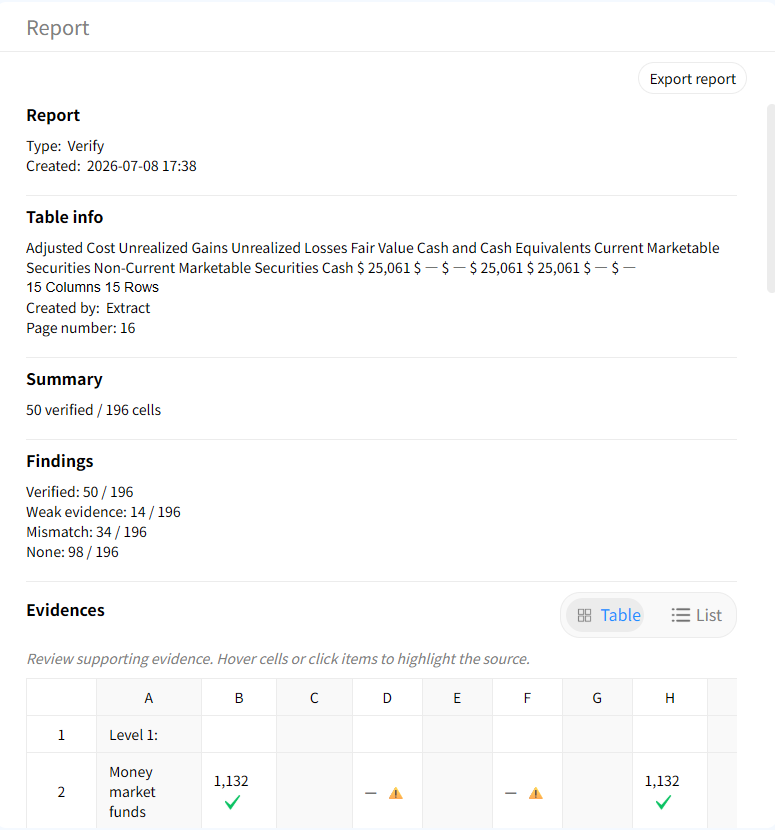
Audit-ready verification reports
Generate audit-ready reports that summarize verified values, discrepancies, unsupported fields, and potential extraction issues.
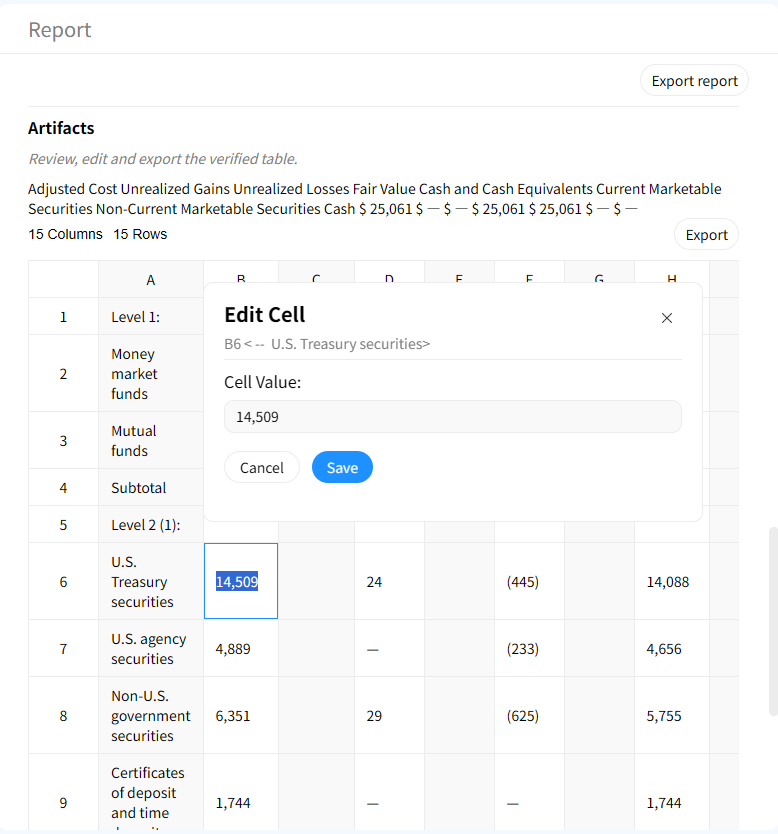
Human-in-the-loop correction
Review flagged issues, update incorrect values, and create a clean final dataset before exporting.
Why validate OCR tables specifically?
Without OCR validation
- × Hidden structural breaks in table rows
- × Numeric '0' misread as 'O' causing calculation errors
- × Misaligned headers break data pipelines
- × No visibility into page-level OCR accuracy
With Gentables validation
- ✓ Visual structural diff highlights every broken cell
- ✓ Character-level confusion reports
- ✓ Automated header-to-data alignment checks
- ✓ High-confidence document validation audits
Perfect for scanned table workflows
Financial Statements & Reports
• Validate OCR results from scanned P&L statements
• Check OCR accuracy for numeric totals and line items
• Prevent data entry errors in financial dashboards
Invoice & Receipt Processing
• Validate extracted tables of line items and quantities
• Ensure unit prices and tax amounts are digitized correctly
• Accelerate AP workflow with reliable document validation
Scientific & Lab Data Sheets
• Verify OCR results from printed measurement tables
• Check special characters (μ, °C, ±) are recognized
• Maintain data integrity for research analysis
OCR table validation FAQs
Turn your scanned tables into validated data assets