Create Side-by-Side Vendor Comparison Tables with AI
Compare vendors objectively without the spreadsheet hassle
Multi-Vendor Aggregation
Upload proposals from multiple suppliers in one go. AI automatically extracts, normalizes, and aligns disparate data points (pricing, features, SLAs) into a single unified comparison structure.
Smart Dimension Discovery
Instead of manually defining rows, AI reads your documents to identify the most relevant comparison dimensions—whether it's response time, security certifications, or integration capabilities.
Cell-Level Source Tracing
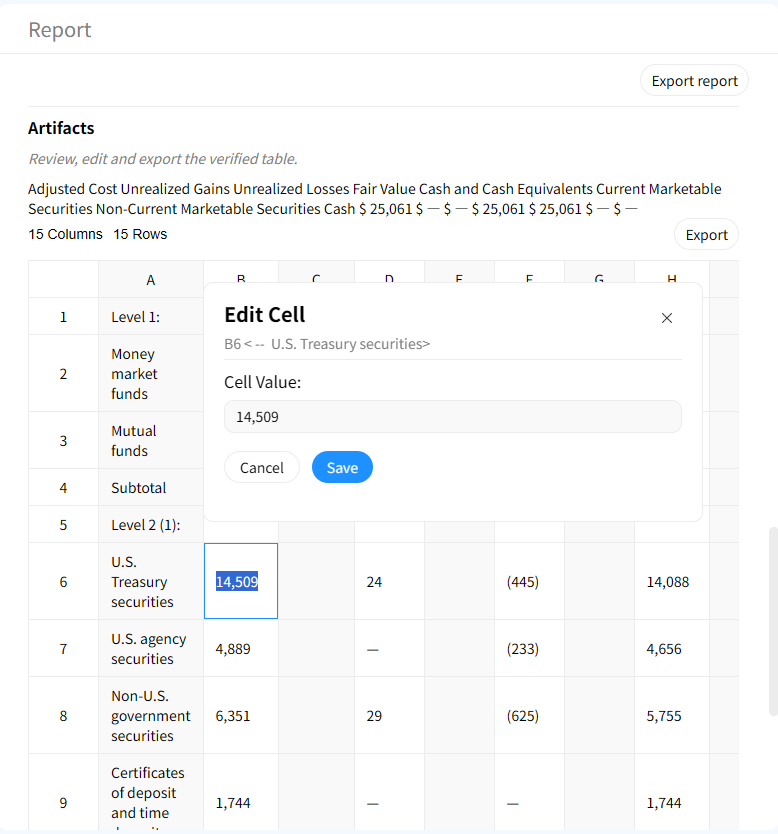
Every value in the comparison table is linked to its original source. Click any cell to instantly highlight the exact sentence in the vendor's PDF, ensuring your comparison is fact-based and defensible.
How to generate a vendor comparison matrix with AI
1. Upload supplier documents
Upload vendor proposals, RFP response attachments, product datasheets, or even past performance reports. Gentables supports PDF, Word, and Excel formats.
2. Let AI identify comparison axes
AI scans all documents to find common comparison points—cost structures, service levels, technical specifications, and contractual terms.
3. Generate the comparison matrix
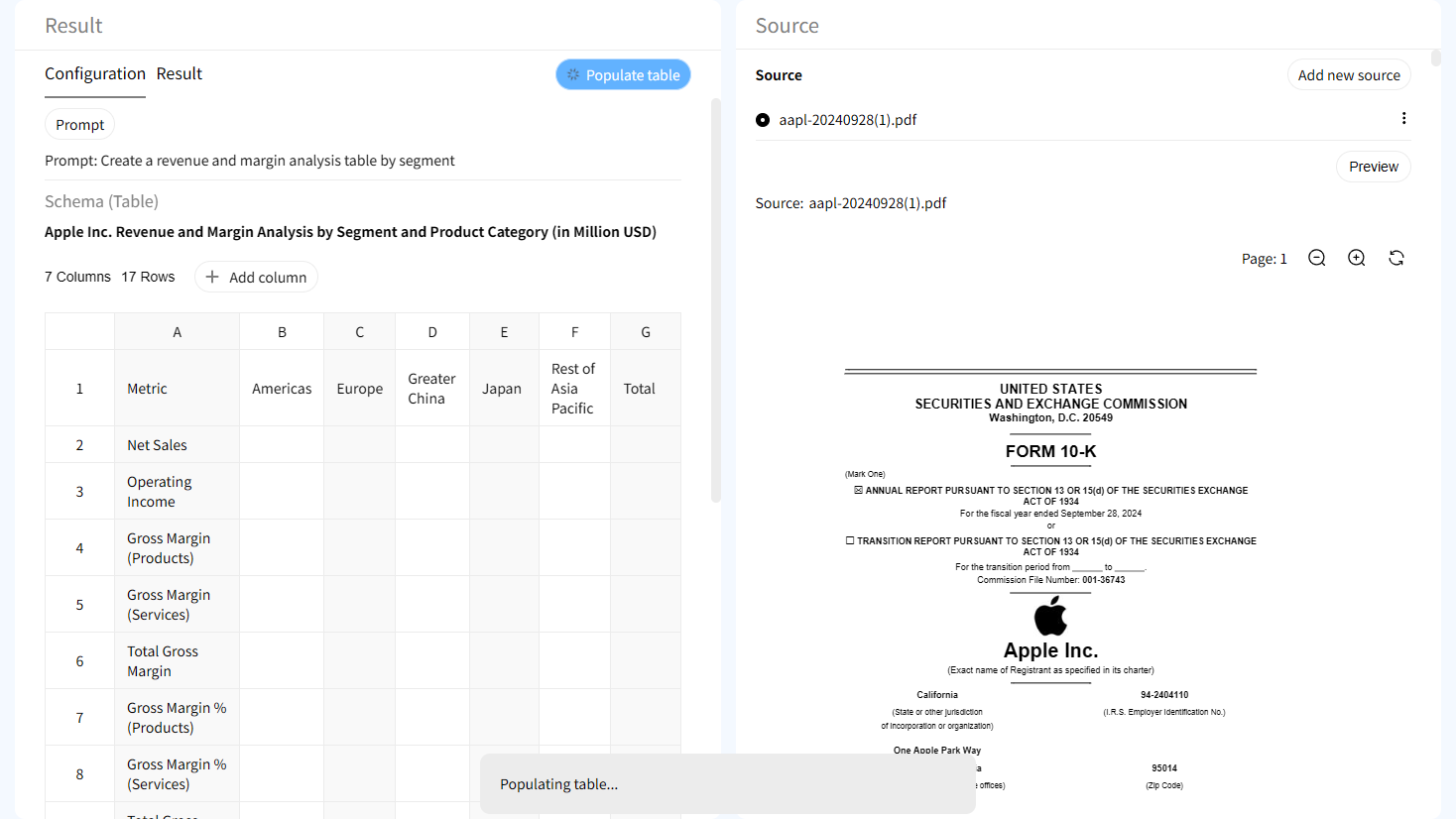
AI populates a structured table with vendors as columns and comparison dimensions as rows, filling each cell with the specific data extracted from each document.
4. Review and verify with source evidence
Hover or click on any data point to pull up the source evidence panel. Validate the AI's extraction against the original text instantly.
5. Customize dimensions on the fly
Don't need a specific row? Add, remove, or rename comparison dimensions interactively without re-uploading your documents.
6. Export for stakeholder review
Download the clean comparison table to Excel or CSV for sharing with your procurement committee or project stakeholders.
Built for transparent vendor benchmarking
Multi-document comparison table creation
Handle multiple sources simultaneously. AI aligns disparate data points from different formats into one cohesive comparison table.
Traceable evidence for every difference
Disagree with a comparison? Click the cell to see the original text. This provides audit-grade transparency for competitive analysis.

Interactive source highlighting
Jump directly from a table cell to the exact location in the source document where the value was found.

Human-in-the-loop workflows
Create traceable tables with evidence trails suitable for investment research, reporting, compliance, and review processes.
AI Vendor Table vs Manual Comparison Spreadsheets
Manual Spreadsheet Comparison
- • Hours of manual data entry
- • Misaligned rows and columns
- • Lost source references
- • Static snapshot, hard to update
Gentables AI Vendor Comparison
- ✓ Generates matrix in minutes
- ✓ Auto-extracts & aligns attributes
- ✓ Cell-level document traceability
- ✓ Interactive & editable on the fly
Who uses AI vendor comparison tables?
Procurement & Sourcing
• Compare RFP responses side-by-side
• Evaluate supplier capabilities
• Build vendor shortlists
IT & Software Selection
• Compare SaaS feature sets
• Assess cloud provider specs
• Evaluate integration partners
Supply Chain Management
• Compare logistics providers
• Benchmark supplier compliance
• Review contract terms visually
Vendor comparison table FAQs
Benchmark your vendors with confidence