Image to Google Sheets – Direct to Cloud
How to convert image to Google Sheets
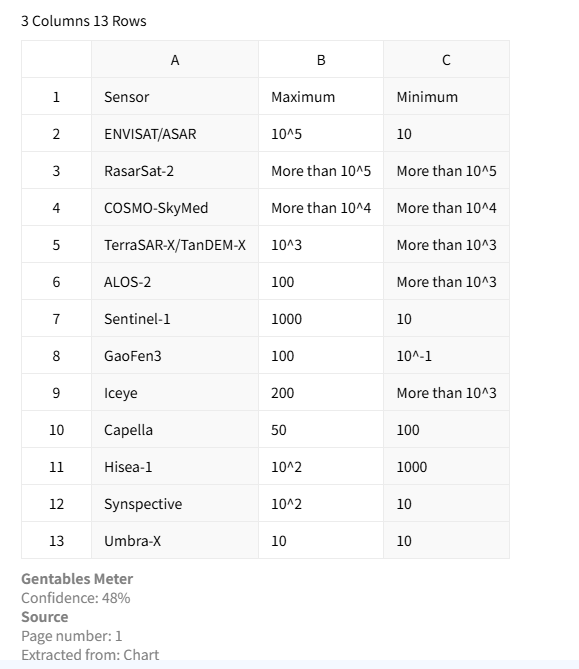
1. Sign in with Google
Securely authorize our tool to create a new Sheet in your Drive.
2. Upload your image
Upload a PNG, JPG, or photo containing a table.
3. Open your new Google Sheet
We create the Sheet and open it in your browser – start sharing and editing instantly.
AI vs Manual Image to Sheets Conversion
Stop manual data entry
- × Stop retyping tables from images into spreadsheets
- × Stop fixing misaligned rows and columns manually
- × Stop wasting time on repetitive data formatting
Convert to Sheets instantly
- ✓ One-click conversion to structured cloud spreadsheets
- ✓ Ready for sharing, collaboration, and analysis
- ✓ Clean formatting optimized for reuse and editing
Best AI tool for image to Google Sheets conversion
No download, no upload to Sheets
Most tools make you download a CSV/Excel, then manually upload to Google Drive. We skip both steps – the Sheet appears directly in your Drive.
OCR for handwritten tables?
Our AI works with printed and moderately clean handwritten tables in images – perfect for digitizing whiteboard notes or handwritten forms.
Real-time collaboration ready
The output is a native Google Sheet. Share the link with your team, leave comments, edit simultaneously – all the collaboration features you expect.
Common use cases
Analysts & Finance
• Convert financial screenshots into Google Sheets
• Turn invoices and reports into structured cloud data
• Prepare reusable datasets for dashboards and analysis
Researchers & Consultants
• Convert research images into structured Sheets
• Standardize data from visual reports and documents
• Build reusable datasets for analysis and modeling
Operations & Compliance
• Convert forms and screenshots into shared Sheets
• Digitize image-based documents into structured data
• Streamline workflows with collaborative spreadsheets
FAQs about image to Google Sheets conversion
Convert your image to Google Sheets now



